




Press play to start listening
Windows users who manage cryptocurrency on their PCs are being targeted by OkoBot malware, an active operation designed to steal wallet files, recovery phrases, passwords, and browser data while recording activity within financial applications.
Kaspersky identified the campaign in January 2026 after investigating malware that recorded the on-screen activity of cryptocurrency wallets. Researchers found a four-stage operation containing more than 20 malicious payloads and implants.
An Ongoing Campaign
OkoBot malware campaign has already affected hundreds of users in more than 25 countries, with Brazil, Vietnam, Canada, Mexico and Türkiye recording the most detections. Kaspersky said the campaign remained active when its long technical analysis was published on 15 July 2026.
According to researchers, OkoBot reaches Windows computers through ClickFix scams and malicious software advertised through GitHub. ClickFix attacks display fake errors or verification instructions that persuade users to copy and run commands in PowerShell or the Windows Run dialog.

One GitHub repository advertised a fake version of Microsoft SQL Server Management Studio and appeared near the top of search results for SSMS. Its README copied the style of official Microsoft installation guides, while the download contained a modified Audacity build with malware embedded in one of its libraries. The repository operated from March to June 2025.
Once the malicious PowerShell script, called TookPS, runs, it installs SSH and connects the computer to an attacker-controlled server. An automated bot then collects usernames, the Windows version, antivirus details, and the IP address before stealing cryptocurrency wallet files, browser cookies, profiles, and stored credentials.
That remote connection also lets the attackers prepare the PC for continued control. Once there, OkoBot malware disables Windows Defender notifications, opens firewall ports for Remote Desktop, creates a new remote user, and modifies a Windows system file to permit several RDP sessions. A scheduled task named “Apple Sync” reconnects the machine to the attackers every hour.
OkoSpyware
Researchers further noted that the campaign also delivered additional malware components through the SSH connection. One implant, analysed by the cybersecurity giant, was OkoSpyware, capable of recording video of 100s of wallet application windows while logging the user’s keystrokes.
Some of these applications targeted by OkoSpyware include:
- Exodus
- MetaMask
- Tonkeeper
- Litecoin QT
- KeePassXC
- 1Password.
Targeting Hardware Wallets with SeedHunter
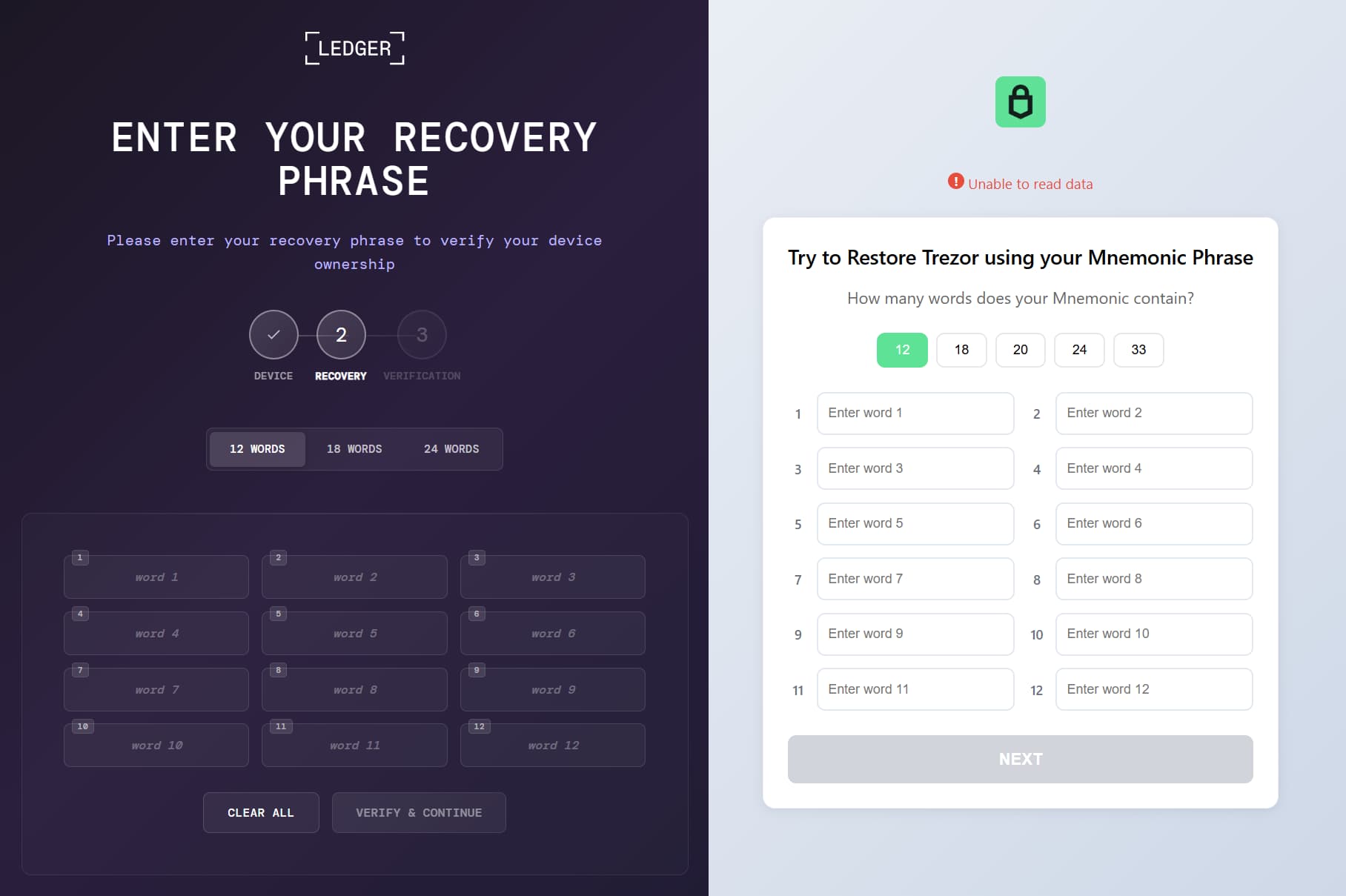
Hardware-wallet owners are also targeted in this campaign, facing a separate component called SeedHunter, which injects malicious code into popular hardware wallets, including:
- Trezor Suite
- Ledger Live
- Ledger Wallet
When a connected hardware wallet is detected, the malware displays a fake recovery page designed for the relevant device and sends any entered seed phrase to its command server.
Malicious Browser Extensions
Another threat within the campaign targeting crypto users is the malware’s capability of monitoring browser activity through hidden malicious extensions installed in Chromium-based browsers.
OkoBot does that by modifying browser processes to load the extensions, grant their requested permissions, suppress related warnings, and remove them from the extensions list shown to the user.
Kaspersky researchers could not attribute OkoBot to a known cybercrime group. However, the malware servers blocked connections from Russia and other CIS countries, and parts of the code contained Russian-language comments.
These factors indicate Russian-speaking involvement but do not reveal the operators’ location, which could be Russia, Ukraine, another CIS country, or elsewhere.
Protect Your Crypto Funds
Nevertheless, anyone instructed by a website or support message to paste commands into PowerShell should stop and close the page. Crypto and development tools should be downloaded from the official publisher, not an unfamiliar GitHub repository found through search results.
Users should never enter a wallet recovery phrase into an unexpected form, even when it appears inside Ledger or Trezor software. Anyone who entered a seed phrase into a suspicious window should use a clean device to create a new wallet and transfer the funds immediately. Changing the wallet application password will not protect assets when the recovery phrase has already been stolen.


