





Single Sign-On (SSO) is a cornerstone of modern enterprise productivity and security, allowing users to access multiple applications through a single authentication event. On Windows, both Microsoft Edge and Google Chrome support SSO to web applications as well as resources that rely on Microsoft Entra ID (formerly Azure Active Directory) for identity and access management, such as: Microsoft Office 365, Microsoft Teams, Copilot, and OneDrive.
This article provides a deep technical dive into how SSO to these applications and resources is achieved from these browsers on Windows. It focuses on the underlying Windows components and the security mechanisms that safeguard user and device credentials.
Technical Architecture
Key Components
Microsoft Edge and Google Chrome browsers on Windows utilize the ProofOfPossessionCookiesInfo API to request Single Sign-On (SSO) cookies, which are then attached to outbound requests targeting Entra ID.
This API is a public COM interface hosted by the MicrosoftAccountTokenProvider.dll, and it orchestrates interactions with several key Windows components to generate and return the required cookies for SSO.
Microsoft Account Token Provider (MicrosoftAccountTokenProvider.dll ): Acts as the COM server hosting the ProofOfPossessionCookiesInfo API. It validates the caller (e.g., Microsoft Edge or Medium- Integrity Level application such as Google Chrome) and coordinates cookie retrieval.
AAD Cloud Authentication Package Plugin (aadcloudap.dll): is a Windows component loaded by the Local Security Authority Subsystem Service (LSASS). Among its various responsibilities, it handles the creation and management of Single Sign-On (SSO) cookies, including the Primary Refresh Token (PRT) and device SSO cookies associated with the device’s primary user.
AAD Token Broker COM Server (aadtb.dll): It hosts the BrowserSSO.CookieStore, a private WinRT API responsible for the creation and management of Single Sign-On (SSO) cookies associated with Microsoft Entra Registered (Workplace Joined) accounts.
Device State and Workflow
The workflow for retrieving SSO cookies differs based on the device’s state:
Microsoft Entra Joined and Microsoft Entra Hybrid Joined Devices
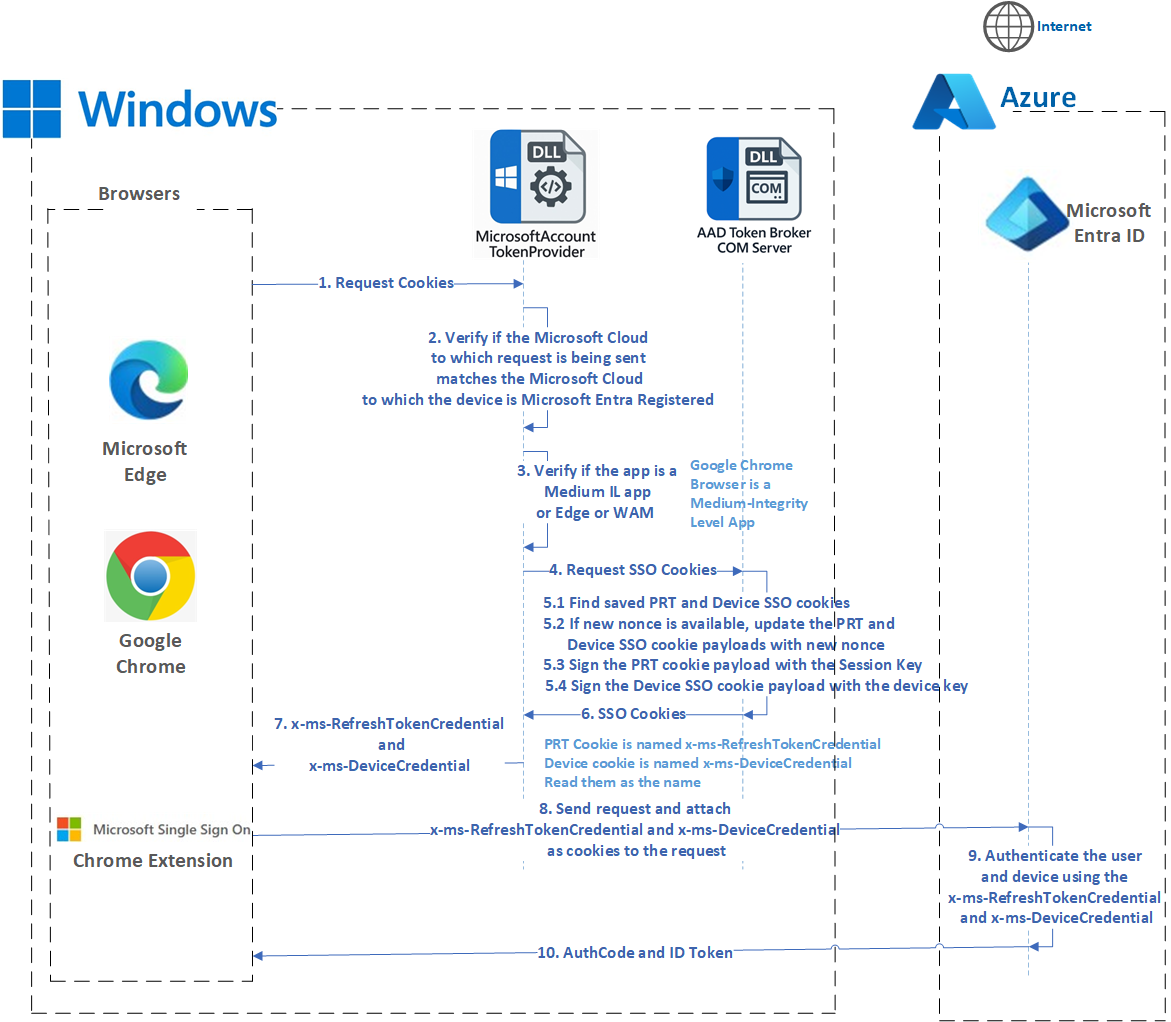
On Microsoft Entra Joined and Microsoft Entra Hybrid Joined devices, the sequence for requesting and retrieving the SSO Cookies belonging to the primary default user on the device is depicted using the UML sequence diagram below:

- Browsers such as Microsoft Edge, Google Chrome and the Microsoft Single Sign-On extension for Google Chrome use the ProofOfPossessionCookieInfo API to request PRT and device SSO cookies. Please note that the PRT and device SSO cookies are referred to as x-ms-RefreshTokenCredential and x-ms-DeviceCredential, respectively. These terms can be used interchangeably.
- MicrosoftAccountTokenProvider verifies if the Microsoft Cloud to which the request is being sent matches the Microsoft Cloud to which the device is Microsoft Entra Joined or Microsoft Entra Hybrid Joined.
- MicrosoftAccountTokenProvider validates that the request for cookies is from either Edge or from Medium-IL (Win32) applications such as Google Chrome.
- Once the validation is successful, then MicrosoftAccountTokenProvider requests a PRT cookie from LSASS.
- AAD Cloud Authentication Package Plugin (AAD CloudAP Plugin) does the following when it gets the request for SSO cookies. It attempts to retrieve a cached PRT cookie. If a cached cookie is found, checks if it can be reused (based on nonce/time); if so, returns it. If not, it creates a new PRT cookie by first creating a JWT payload which has the PRT, nonce if provided and other info and then signs it using the Session Key (A symmetric Proof-of-Possession key). The algorithm which is used for signing the JWT payload is HMAC-SHA256.
- AAD CloudAP plugin/LSASS returns the PRT cookie to MicrosoftAccountTokenProvider, which names it x-ms-RefreshTokenCredential.
- MicrosoftAccountTokenProvider requests a device SSO cookie from LSASS in the subsequent request.
- AAD CloudAP plugin does the following to return a device cookie: Attempts to retrieve a cached device cookie. If a cached cookie is found, checks if it can be reused (based on nonce/time); if so, returns it. If not, it creates a new device cookie by first creating a JWT payload, which has the tenant ID, nonce if provided, and other info and then signs it using the device certificate. The algorithm which is used for signing is RSA-SHA256.
- AAD CloudAP plugin/LSASS returns the device cookie to MicrosoftAccountTokenProvider, which names it x-ms-DeviceCredential.
- MicrosoftAccountTokenProvider returns the x-ms-RefreshTokenCredential and x-ms-DeviceCredential to the Browser.
- The browser attaches these SSO artifacts as cookies to the request being sent to Entra ID.
- Entra ID uses these SSO cookies to authenticate the user and device without prompting the user for credentials, when possible.
- Entra ID issues an Auth Code and an ID Token to the browser, which is redirected to the web application or service. The web application or the service exchanges the auth code for an access token and uses it to access the user’s resources.
Microsoft Entra Registered or Workplace Joined Devices
When a user adds a work account on a Windows device, WAM will Microsoft Entra Register the device and fetch a Primary Refresh Token (PRT) for the user. This PRT is stored in the WAM cache and is protected by DPAPI keys.
Along with storing the PRT in cache, WAM also creates a PRT cookie and a device SSO cookie and saves the cookies in the user’s registry (HKCU).
In the case of Microsoft Entra registered devices, MicrosoftAccountTokenProvider requests the SSO cookies by calling a private WinRT API hosted in aadtb.dll
The AAD Token Broker COM server does the following when it gets the request for SSO cookies.
- It attempts to retrieve the saved PRT cookie and the device SSO cookie.
- If the URL has a nonce, then a new PRT cookie is created by first creating a JWT payload which has the PRT from the saved PRT cookie and the nonce from the URL and then signing it payload using the Session key (A symmetric Proof-of-Possession key). The algorithm which is used for signing is HMAC SHA256. A new device SSO cookie is also created by creating a JWT payload which has the tenant ID, nonce if provided and other info and then signing it using the device certificate. The algorithm which is used for signing is RSA-SHA256.
- The newly created SSO cookies are saved in the user’s registry and then returned to MicrosoftAccountTokenProvider.
Security
Proof of Possession
Nonce-Based Validation: PRT and Device SSO cookies are only valid while their embedded nonce claims remain valid (typically 5 minutes). If a nonce is invalid or expired, Entra ID issues a new nonce and requires Proof-of-Possession (PoP).
Device Bound SSO Cookies: Only a legitimate client with access to the session key (PoP key) can generate a valid PRT cookie in response to the nonce challenge. Similarly, only a client with access to the device key can generate a valid Device SSO Cookie in response to the nonce challenge.
Attack Resistance
Replay Attack Mitigation: The combination of nonce-based validation and Proof ensures that stolen cookies are unusable without the session key and the device key. When challenged with a new nonce, the attacker cannot produce a valid PoP without access to the session key and the device key, rendering the stolen cookies ineffective.
Short-Lived Access Tokens: In the highly unlikely event that an attacker manages to steal these SSO cookies from a victim’s device, transfer them to their own device, and use them within the 5-minute nonce validity window, access to the victim’s resources is limited to the lifetime of the access token (typically one hour). Once the access token expires, the attacker will be unable to refresh it or obtain a new token using the stolen SSO cookies, as the nonce within the stolen SSO cookie has already expired and Entra ID will challenge the attacker with a new nonce which the attacker will not be able to satisfy the challenge as they do not possess the session key or device key.
Future Enhancements
Expanding Support to Other Browsers: Popular browsers such as Mozilla Firefox could also be extended to support Single Sign-On (SSO) by leveraging the APIs provided by Windows. This would enable seamless SSO to Microsoft Entra ID-protected resources across a broader range of browsers.
Conclusion
Microsoft Edge and Google Chrome on Windows achieve Single Sign-On (SSO) to Microsoft Entra ID-protected resources by leveraging Windows APIs. This process involves a sophisticated interplay of Windows authentication components and robust security mechanisms. Key elements such as the ProofOfPossessionCookiesInfo API, nonce-based validation, and device-bound SSO cookies work together to deliver a seamless user experience while providing strong protection against modern attack vectors.
Understanding these mechanisms is essential for browser developers aiming to implement SSO for Entra ID resources, as well as for IT administrators, security professionals, and support teams responsible for maintaining secure and productive enterprise environments.
References
- D. Hardt, “The OAuth 2.0 Authorization Framework,” RFC 6749, IETF, Oct. 2012. . Available: https://www.rfc-editor.org/rfc/rfc6749
- N. Sakimura, J. Bradley, M. Jones, B. de Medeiros, and C. Mortimore, “OpenID Connect Core 1.0,” OpenID Foundation, Nov. 2014. . Available: https://openid.net/specs/openid-connect-core-1_0.html
- J. Bradley, H. Tschofenig, and N. Sakimura, “Proof-of-Possession Key Semantics for JSON Web Tokens (JWTs),” RFC 7800, Internet Engineering Task Force (IETF), Apr. 2016. . Available: https://datatracker.ietf.org/doc/html/rfc7800
- NIST, “Zero Trust Architecture,” NIST Special Publication 800-207, Aug. 2020. . Available: https://doi.org/10.6028/NIST.SP.800-207
