




Press play to start listening
A new ClickFix attack campaign uses fake CAPTCHA pages to trick users into running malicious commands. Learn how hackers use cmdkey and regsvr32 to maintain persistence and evade detection on Windows systems.
CyberProof Threat Research Team has found a new campaign where hackers are compromising Windows computers using the ClickFix method. This technique is not new, but it is becoming much more common. Hackers have used similar ClickFix lures to impersonate Google Meet, Microsoft Word, and even GitHub to trick people into running malicious code.
Hackread.com has been consistently reporting the growing involvement of this technique in attacks, as scammers find it to be a very reliable way to bypass advanced security tools. This latest version of the scam was found by CyberProof in April 2026.
The CAPTCHA Trick
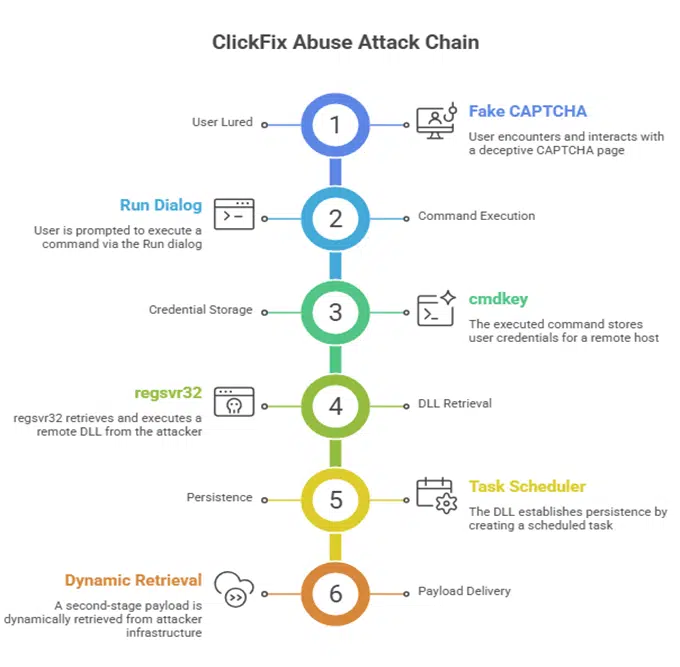
The social engineering-based attack generally starts with a fake CAPTCHA-like security check or a browser error, which informs the user that to fix the issue, they must press the Windows key and R (Win + R), and paste a specific command.
According to CyberProof, this attack version is different because it avoids common tools like PowerShell or rundll32, which security software can easily spot, and instead, uses two other native Windows utilities- cmdkey and regsvr32.
Using these LOLBins (trusted Windows files already existing on the computer), the hackers can operate without alerting the user. And, since the user manually starts the process, the computer assumes the activity is legitimate. The malicious command even includes a fake ‘I am not a robot’ comment to make the code look like a real Cloudflare security check.
Using Hidden Files
When this command is pasted, it quickly connects to a server at this IP address- 151.245.195.142, using a UNC path. From there, it fetches a file named demo.dll. This is a 64-bit Windows DLL file designed to run silently. It uses a function called DllRegisterServer to launch a hidden CreateProcessA call, which then sets up a scheduled task on the computer so the hackers can maintain persistence.
The attackers named this task RunNotepadNow to make it appear as a boring, everyday background process. Another interesting part is that the task instructions are not even kept on the computer, but retrieved from a remote file called 777.xml. Researchers noted that by using these trusted tools, the attacker “achieves a high degree of stealth while maintaining execution reliability.”
“In this campaign, victims are socially engineered into executing a single malicious command via the Windows Run dialog (Win + R). That command chains multiple actions to stage credentials, retrieve a remote DLL, and execute it silently. By relying exclusively on trusted Windows components and avoiding obvious malware drops, the attacker achieves a high degree of stealth while maintaining execution reliability,” the report reads.
Why is it Hard to Catch
Hackers have stored that XML file on their own servers. This allows them to change instructions whenever they want without sending a new file to update the attack. Researchers stated that at the time of publishing this research, the server at 151.245.195.142 was already down, making it hard to identify exactly what the hackers were planning to do next.
CyberProof researchers suggest the best way to stay safe is to never copy-paste code from a website into your computer’s Run box, no matter how real the CAPTCHA looks.