




Press play to start listening
Nobody likes to sit through a 30-second unskippable ad by choice, and DuckDuckGo is betting that plenty of people would switch browsers just to avoid it. The company announced today that its browser now blocks most video ads on YouTube, including the ones that play before a clip starts and the ones that interrupt it midway through.
Tired of ads interrupting your videos? Us, too, the company said in its announcement, framing the update as a direct response to viewer frustration rather than a routine feature drop.
How Will It Work?
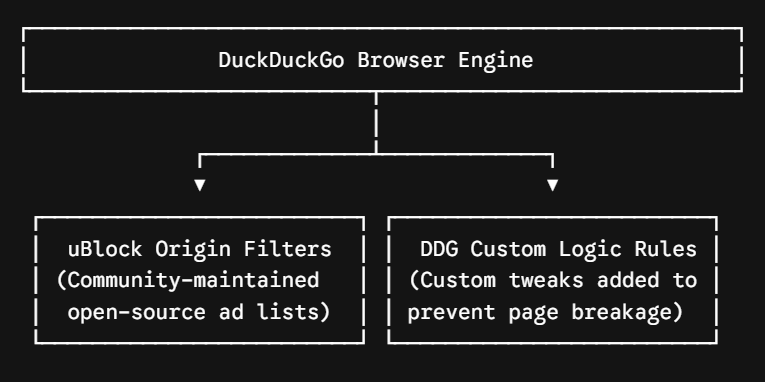
Turning on ad blocking, as we know it, is the easy part, but actually catching YouTube’s ads before they load is where the real engineering happens. DuckDuckGo says it uses community-driven filter lists sourced from uBlock Origin, lists maintained by an active open-source community and regularly updated to keep up with changes to how ads are served, while also applying its own rules to improve compatibility and reduce breakage.
Using an established filter list gives DuckDuckGo a faster way to keep up with YouTube’s ad system, but it also means the feature will depend on how quickly those lists are updated when YouTube changes how ads are delivered.
DuckDuckGo says the ad blocker can add some buffering, which is common with ad blockers, but once the video loads, viewers should not be interrupted by ads.
It is worth noting that DuckDuckGo already had a YouTube-focused privacy tool called Duck Player before this update, which can confuse some users. Duck Player is the browser’s cleaner theater-style mode for watching YouTube videos with fewer distractions, tracking cookie protections, and YouTube’s strictest privacy settings for embedded video.
The new YouTube Ad Blocking feature is different because it works on the regular YouTube site. Using both gives viewers the cleanest experience DuckDuckGo currently offers.
What About Mobile Users?
On iPhone, the feature should already be active for most DuckDuckGo browser users. Android users may still need to turn it on manually in Settings until DuckDuckGo enables it by default.
The catch is where the video opens. If a YouTube link launches the YouTube app, DuckDuckGo cannot block the ads there. The video needs to open on YouTube’s website inside the DuckDuckGo browser for the ad blocking to work.
Reaction from YouTube
YouTube did not respond to this development, but its support page says “ad blockers violate the platform’s Terms of Service” and warns that viewers may need to allow ads, subscribe to Premium, or lose playback access.
PCWorld called the update an “escalation of force,” since the company promoted it with a press release and a dedicated information page. Google has spent years pushing back against ad blockers on YouTube, so this feature is likely to face the same back and forth as other blockers.
Nevertheless, whether DuckDuckGo gets treated like any other blocker, or becomes a bigger target because the feature is built directly into the browser, is the next thing to watch.