



Press play to start listening
Microsoft has uncovered a TerminalFix campaign that uses fake Cloudflare CAPTCHA pages to trick users into running malicious PowerShell commands. The malware then establishes a reverse tunnel that turns the infected computer into a network pivot, giving attackers proxy access to internal systems reachable from that device.
How the Trick Works
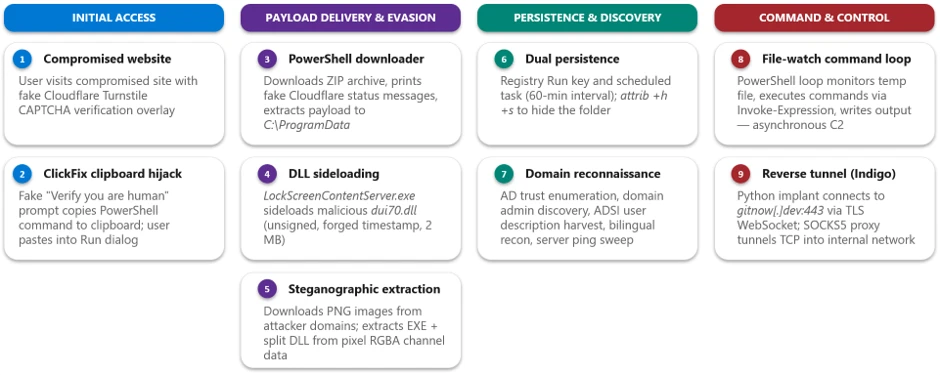
According to Microsoft Threat Intelligence, TerminalFix is a variant of the ClickFix tactic and targets organisations in several industries. It starts when someone visits a compromised website showing a fake Cloudflare Turnstile verification screen, complete with the “Verify you are human” checkbox and Cloudflare branding.
When a user interacts with the fake prompt, the site copies a malicious command to the clipboard. It then asks them to open Windows Terminal or PowerShell and paste it. The command displays Cloudflare-themed messages to make the activity look legitimate while downloading a ZIP archive and extracting it to C:\ProgramData\f47f2a8c21c9df4e.
The archive contains a legitimate, signed LockScreenContentServer.exe binary and a malicious dui70.dll. The attackers place the DLL next to the executable so the legitimate program loads the malicious library, a technique called DLL sideloading.
Malware Hidden in Images
The sideloaded DLL launches another PowerShell script that downloads PNG images from attacker-controlled infrastructure. Using steganography, the script extracts payload data hidden in the images’ pixel channels. It retrieves an executable from one image and two DLL fragments from others, then reassembles the DLL on disk before deleting the images.
To maintain access after a restart, the malware creates a Registry Run key and a scheduled task that launches LockScreenContentServer.exe every 60 minutes. It conceals the staging directory by applying Windows system and hidden file attributes.
The malware then conducts Active Directory reconnaissance, searching for domain trusts, users, computers and domain administrators. It also probes named servers to identify potentially valuable infrastructure, including domain controllers, databases, backup systems, gateways and mail servers.
Turning an Infected PC Into a Network Pivot
Microsoft also found a persistent PowerShell loop that monitored a text file for new instructions. It executed commands through Invoke-Expression, saved the results to another file, and allowed the attacker to retrieve the output through the reverse tunnel.
The bigger threat comes later. The attackers deploy an embeddable Python 3.14.5 runtime and a custom client.py tunneling implant, launched through pythonw.exe without a visible console window.
The implant connects to attacker-controlled infrastructure at gitnow(.)dev:443, upgrades the connection to a WebSocket over TLS, and relays arbitrary TCP traffic. Its SOCKS5-style address handling allows attackers to reach systems accessible from the compromised computer.
Microsoft did not observe downstream activity through the tunnel in the chain it analysed. The company warned that this access could allow attackers to escalate privileges, disable security controls, steal sensitive data or deploy ransomware.
Microsoft advises organisations to restrict PowerShell where it is not needed, enable PowerShell script block logging and look for LockScreenContentServer.exe running outside C:\Windows\SystemApps.
Users should also be cautious of CAPTCHA pages that ask them to copy and paste commands into Windows Terminal or PowerShell, as legitimate verification pages do not require this.