





Press play to start listening
Zimperium’s zLabs team has identified ToxicPanda 2.0, an updated Android banking trojan capable of targeting hundreds of financial apps while giving its operators deeper control over infected phones.
The new version supports 167 remote commands and phishing overlays for 349 banking, financial, e-wallet and cryptocurrency apps in 16 countries. Its PIN-stealing system separately monitors more than 140 banking and cryptocurrency apps. The earlier ToxicPanda variant supported overlays for only 16 banking apps.
How ToxicPanda 2.0 Infects Android Phones
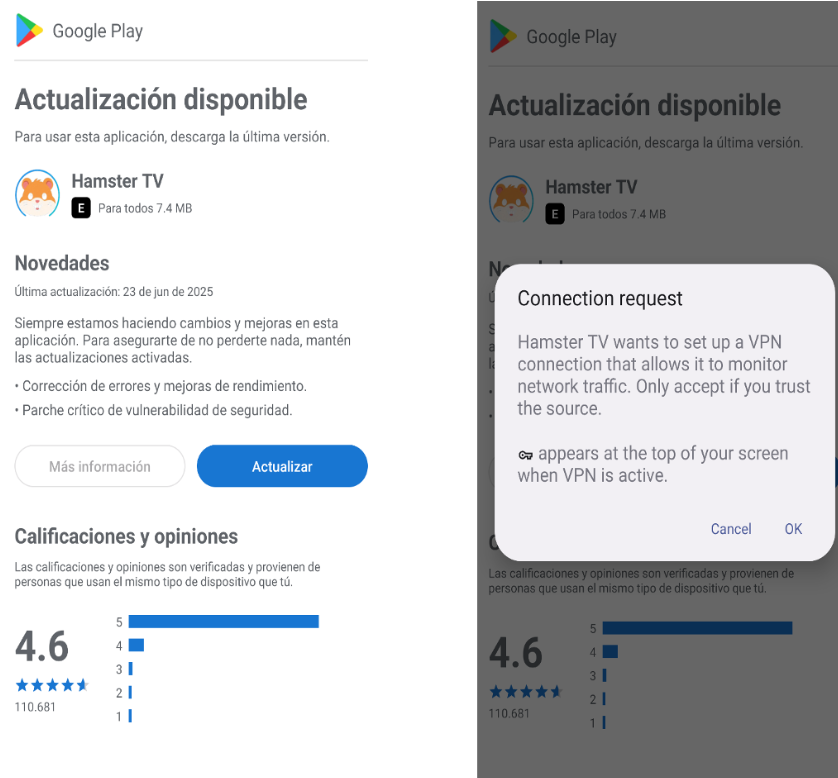
ToxicPanda 2.0 arrives as a dropper that displays a fake installation screen and asks the user for VPN permission. It uses that access to block communications from Google Play and Google Play Services, then decrypts and installs the main payload hidden inside the app.
After installation, the trojan requests access to Android’s Accessibility Service. This legitimate feature helps people interact with their devices, but malware can abuse it to read screen content, press buttons, grant permissions, and change settings without the user performing each action.
When an infected person opens a targeted financial app, ToxicPanda can fetch a matching fake login or transaction screen from its command server and place it over the genuine app. Credentials, PINs, and other information entered into the imitation screen are then sent to the operators. An invisible overlay can also record where the user taps while entering a PIN.
Malware Automates Android Wireless Debugging
One of the more advanced additions abuses Wireless Debugging, an Android developer feature that permits Android Debug Bridge commands over Wi-Fi. ToxicPanda uses automated taps to open the phone’s settings, press the build number seven times, activate Developer Options and turn on Wireless Debugging.
The malware then opens the pairing screen, reads the six-digit pairing code and connection port, and pairs itself with the local ADB service. This gives it shell-level access, which it can use to grant permissions, reduce background restrictions, activate components, and keep operating on the device.
ToxicPanda also contains commands adapted for phones from Samsung, Xiaomi, OPPO, Vivo, Huawei, and other manufacturers. These commands guide the malware through vendor-specific battery and auto-start settings so Android is less likely to stop it in the background.

Fake Lock Screen Steals Unlock Credentials
Operators can display an imitation Android lock screen to steal the device’s PIN, pattern or password. Some variants also show a full-screen fake system update while malicious actions continue in the background. Separate device-administrator commands can prompt users for elevated access and attempt to replace the local lock credential.
Zimperium’s report also found ToxicPanda 2.0 files hosted in Amazon AWS buckets. This means the attackers used AWS storage to deliver malware, not that Amazon’s cloud service was breached. Once active, the Trojan communicates with its command server through an encrypted WebSocket connection.
Jason Soroko, senior fellow at Sectigo, told Hackread.com that the trojan shows how mobile banking malware is progressing from password theft to control of the phone itself.
“Once malware can operate the interface and permissions from inside that phone, the line between a stolen password and a compromised banking session begins to disappear,” Soroko said. He added that phones also store corporate access, identity credentials, cryptocurrency wallets, and account-recovery channels.
The research shows why Android users should avoid installing apps from links, messages, or unofficial stores. Any app that asks for Accessibility, VPN, device-administrator, or Wireless Debugging access deserves scrutiny. Users who see Developer Options or Wireless Debugging enabled unexpectedly should disconnect the phone from financial and corporate accounts and seek technical help.
(Photo by Denny Müller on Unsplash)


